Review Comments (0) Screenshots (5) Questions & Answers (0) Votes (0) Awards (5) Wiki  
Duck Software
5.1
www.ducksoftware.com
Freeware
36 people
Download Coin Collector

769.85 KBDownloaded 273 times

This software was checked for viruses 2 months ago and was found to contain no viruses.
Click here to see antivirus report.
 
Video tutorial for Coin Collector 5.1
Frame
Video tutorial for Coin Collector 5.0
Frame
This video tutorial has been acquired from Downloadtube.com

Review

This is official description

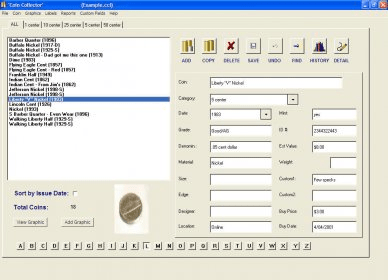
The basic idea behind Coin Collector software is to have a customizable database of all the information on your coins in a single place where you can browse, print out, and edit all sorts of information on your collection. To keep the program's GUI simple, most all the information can be viewed and edited per the main screen. A list of coins is on the left side and can be browsed using arrow or up/down keys. As you browse through the collection, when a coin is highlighted the information for that coin is displayed in the fields to the left of the screen. Also, a picture of the coin can be displayed below the list. The list can also be sorted by the coin description name or Issue Date. You can have all the coins in the list or view smaller lists of categories by using the tabs above the list.
 
The following review written by one of the Software Informer contributors applies to version 5.0

Coin Collector is a program that allows you to have your collection of coins organized in one place. You can organize your coins by category (25 center, 10 center, 1 center, etc, which apparently are denominations of the coins value (or the developer of the program had a little problem with spelling and intended to use "cents"), and include as much info as you want about them, such as name of the coin, year, grade, mint, denomination, weight, id, material, among other data. The data fields are customizable, so you can add only the ones you consider most important or valuable. Moreover, you can even add a picture of the coins. The coins you entered in the collection will appear in the main window by category, or you can view them all, or you can even sort them by issue date. You can print the list of coins by name, date, category, mint, weight, material, etc. and there are different types of reports including, short report, all fields included, or history included. You can also print different labels such as address labels, business cards, diskette labels, note cards, return address labels and file folder labels.
Unfortunately, the user interface is not very attractive and the program looks very old.
In short, Coin Collector can help you organize your collection of coins, but certainly it isn't very intuitive nor attractive. However, it is free and it may help you if you have a small collection, but I wouldn't recommend it.
  • Free.
  • Customizable.
  • Lots of reports.
  • Unattractive user interface.
  • The program is old.

Reviewed by: Silvana Mansilla

Reviewer rating:

Reviewed: 11 months ago

What's new in version 4.0

Graphic to main screen. Report improvements.
Report a wrong version Report a wrong program title Suggest a correction

Screenshots

Main window Main window General view General view Coin image Coin image Set custom report options Set custom report options
All 5 screenshots

Latest comments


There are no comments, be the first one!
Add new comment

E-mail Address:

Password:

Register now »

Forgot password?

Sign in with:
Download Software Informer Client
Copyright © 2012, Informer Technologies, Inc. About| Privacy and terms| Help| Feedback & Support| Partners program